An IPTV player for Android TV and Google TV
ZiroTV runs on Google TV, Android TV, NVIDIA SHIELD and Android TV boxes on Android 7.0 or newer. Bring your own Xtream Codes login or M3U link, and get an interface made for the remote, with a full guide, catch-up and live rewind. Your first 7 days are free.
Signed by BITVIRE and served only from zirotv.com.
On a Fire TV or Google TV, open Downloader and type
zirotv.com/apk
- Fire TVFire OS 6 or newer
- Google TV and Android TVAndroid 7.0 or newer
- Android phones and tabletsAndroid 7.0 or newer
Works on Google TV, Android TV, SHIELD and TV boxes.
- Google TV Streamer
- Google’s own box, with room to spare for the app and its guide.
- Chromecast with Google TV
- It has little free storage, so clear some space before you install.
- NVIDIA SHIELD TV
- A fast player, and its remote has the rewind and fast-forward keys.
- TVs and boxes
- Sony, Philips, TCL, Hisense and other TVs with Google TV or Android TV, and Android TV boxes, on Android 7.0 or newer.
To check the version, go to Settings > System > About, or Settings > Device Preferences > About on an older TV, and look for the Android TV OS version. It needs to be 7.0 or newer.
Short on storage? Clear some space under Settings > Apps before you install, and let Downloader delete the file afterwards.
Install in a few minutes.
- Install Downloader from Google Play on your TV.
- Go to Settings > System > About and select Android TV OS build seven times. On an older Android TV, select Build under Settings > Device Preferences > About.
- Go to Settings > Apps > Security & restrictions > Unknown sources and switch Downloader on. On an older Android TV, it is under Settings > Device Preferences > Security & restrictions.
- Open Downloader, type zirotv.com/apk in the address box and select Go.
- Select Install, then Open.
No Downloader? Send the file from your phone with the Send files to TV app, or copy it to a USB drive and open it with a file manager.
The full Android TV install guideIf the install fails.
- No Unknown sources setting? On many Google TV devices it only appears once developer mode is on. Do step 2 first, then look again.
- “App not installed”. The TV is short on space or older than Android 7.0. Clear some space under Settings > Apps and try again.
- “There was a problem parsing the package”. The download was cut short. Download the file again in Downloader.
Made for the D-pad.
ZiroTV is a 10-foot interface: large type, a clearly marked focus, and every screen within reach of the arrows and OK.
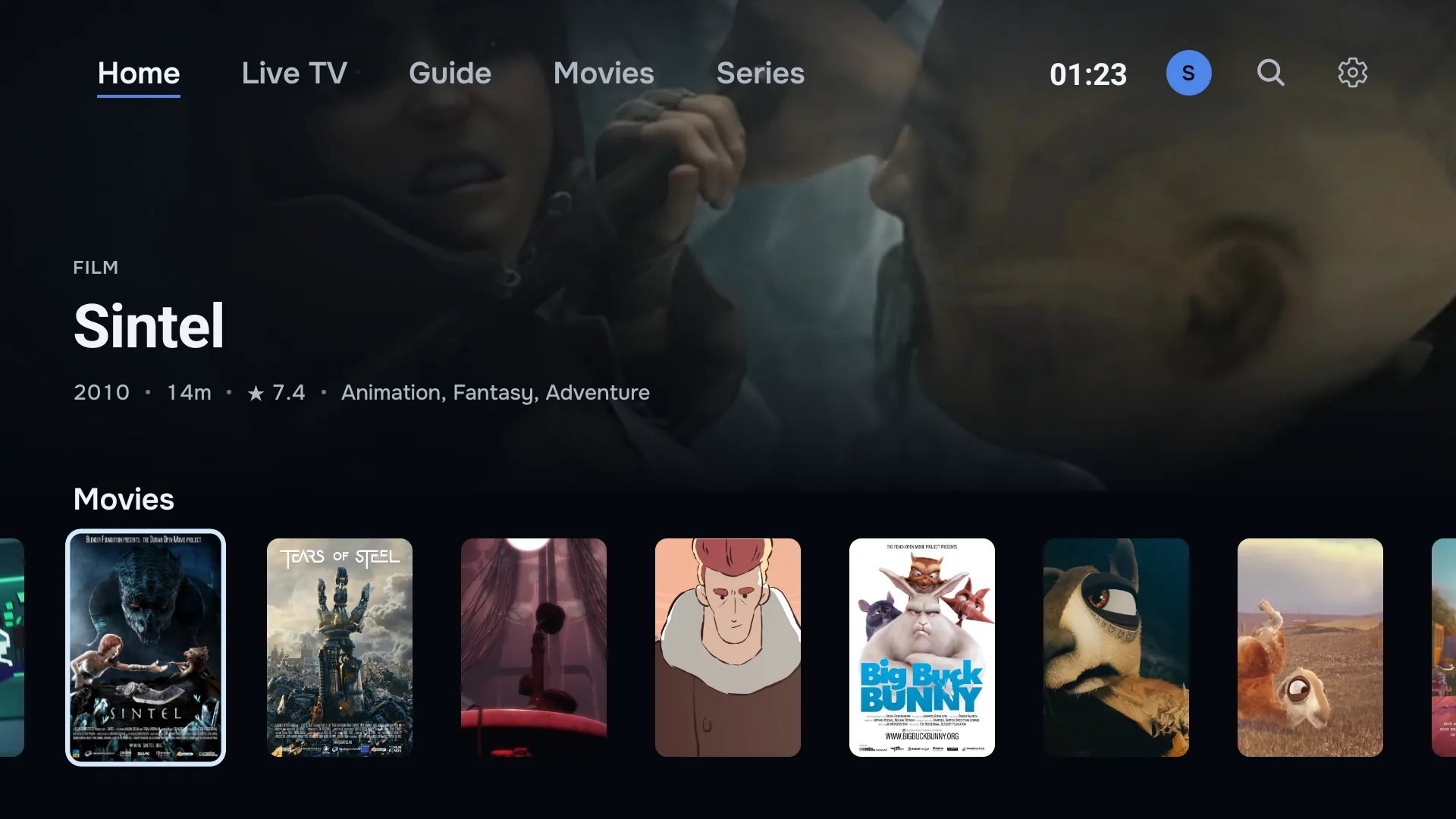
One press between sections.
Home, Live TV and Guide sit along the top of the screen, by name, with Movies and Series when your playlist carries them. Home carries the channel you are watching and rows of your channels, films and series. Land on a film, and its poster, year, running time and rating come up above the row.
While you watch, the buttons on the remote do this.
- Up and down
- Change channel while you watch.
- OK
- Opens the channel list. Hold it to open the full guide.
- Left, right, rewind and fast-forward
- Move through live TV on channels with an archive.
- Guide, menu and number keys
- Where your remote has them: the guide, audio and subtitles, and a channel by its number.
Type your playlist on your phone, not with the remote.
Choose Add from your phone, and the TV shows a code. Scan it, enter your Xtream Codes login or M3U link on your phone, and save.
Rather not scan? Open app.zirotv.com/add on any phone or computer and enter the code and key from the TV. The playlist appears on the TV as soon as you save it, and if the TV is signed in to your account, your other screens get it too.
Signed in, you can also manage your playlists at app.zirotv.com/account: add, edit or delete one there, and the TV follows by itself, with a New playlist notice when one arrives.
Catch-up, live rewind and the full guide.
The whole evening, and the part you missed.
ZiroTV builds a full TV guide from your provider’s EPG, and matches channels to it by name when their IDs do not line up.
Go back in the guide to play a programme you missed, or rewind the one you are watching. Both work on channels where your provider keeps an archive.
See every feature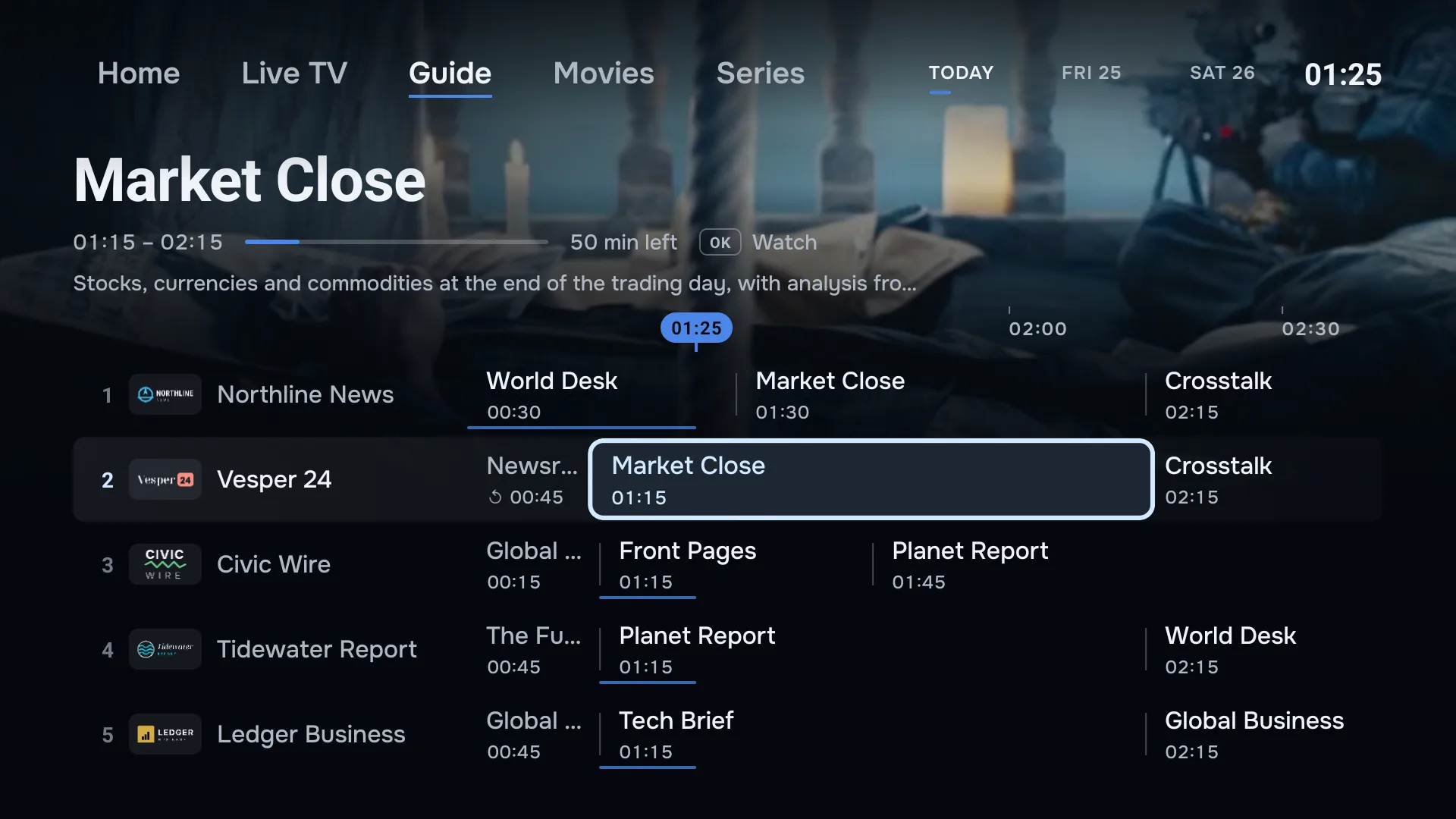
Films and series, laid out like a streaming service.
Seasons, episodes and the next one.
Your provider’s films and series arrive with backdrops, posters and synopses. A series opens by season, and the next episode starts on its own when one ends. Continue watching plays on from where you stopped.
Films and series in ZiroTV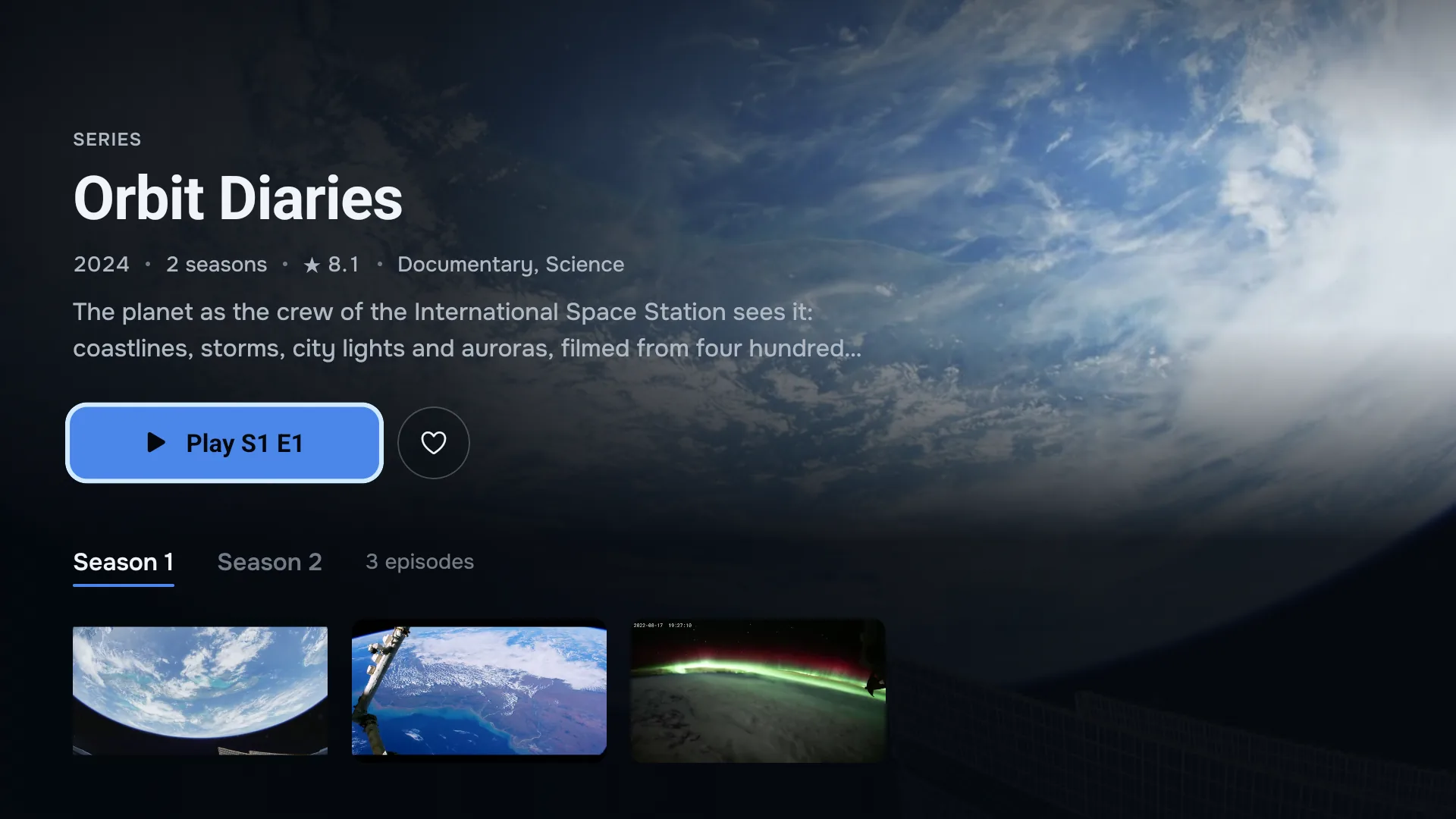
Best IPTV player for Google TV? What to look for.
Five things separate a good Google TV player from a frustrating one. Check them in any player you try, ours included.
- Built for a TV. Look for a layout made for the D-pad, not a phone app with bigger buttons.
- Guide data on the right channel. Automatic EPG matching saves an evening of fixing channel IDs by hand.
- Your playlist on every screen. With an account that syncs playlists, a second TV is ready without retyping a login.
- Everything on every plan. Check which features a free or basic tier holds back before you get used to them.
- Honest about its limits. A good player says what it cannot do, such as recording or Stalker portals, before you pay.
Android TV questions.
Is ZiroTV on Google Play?
Not yet. You install it from zirotv.com, with the Downloader app from Google Play or with a file sent from your phone. After that, new versions arrive inside ZiroTV.
Does it work on a Chromecast with Google TV?
Yes. Install it with the steps on this page. The Chromecast has little free storage, so let Downloader delete the file afterwards, and clear some space under Settings > Apps if the install fails.
Does it work on a Sony, Philips or TCL TV?
Yes, on any TV with Google TV or Android TV on Android 7.0 or newer, including Sony, Philips, TCL and Hisense. Some models from these brands run a different system, such as Titan OS or VIDAA, and cannot install ZiroTV. Check under Settings > System > About.
Can I type channel numbers?
Yes, if your remote has number keys. Type the number and ZiroTV tunes that channel, whichever category is open. Without number keys, up and down change channel.
Does an NVIDIA SHIELD play it better?
A fast device such as the SHIELD TV opens the guide and changes channel more quickly, and it has room to spare. The picture itself depends on the stream your provider sends and on your network. No player can add quality the stream does not carry.
Where is “Unknown sources” on my TV?
On Google TV, under Settings > Apps > Security & restrictions. On older Android TVs, under Settings > Device Preferences > Security & restrictions. If it is not there, switch on developer mode first, as in step 2, and look again.
Get ZiroTV on your TV tonight.
Download the app, add your playlist and enjoy 7 days on us.
Already have an account? Sign in at app.zirotv.com